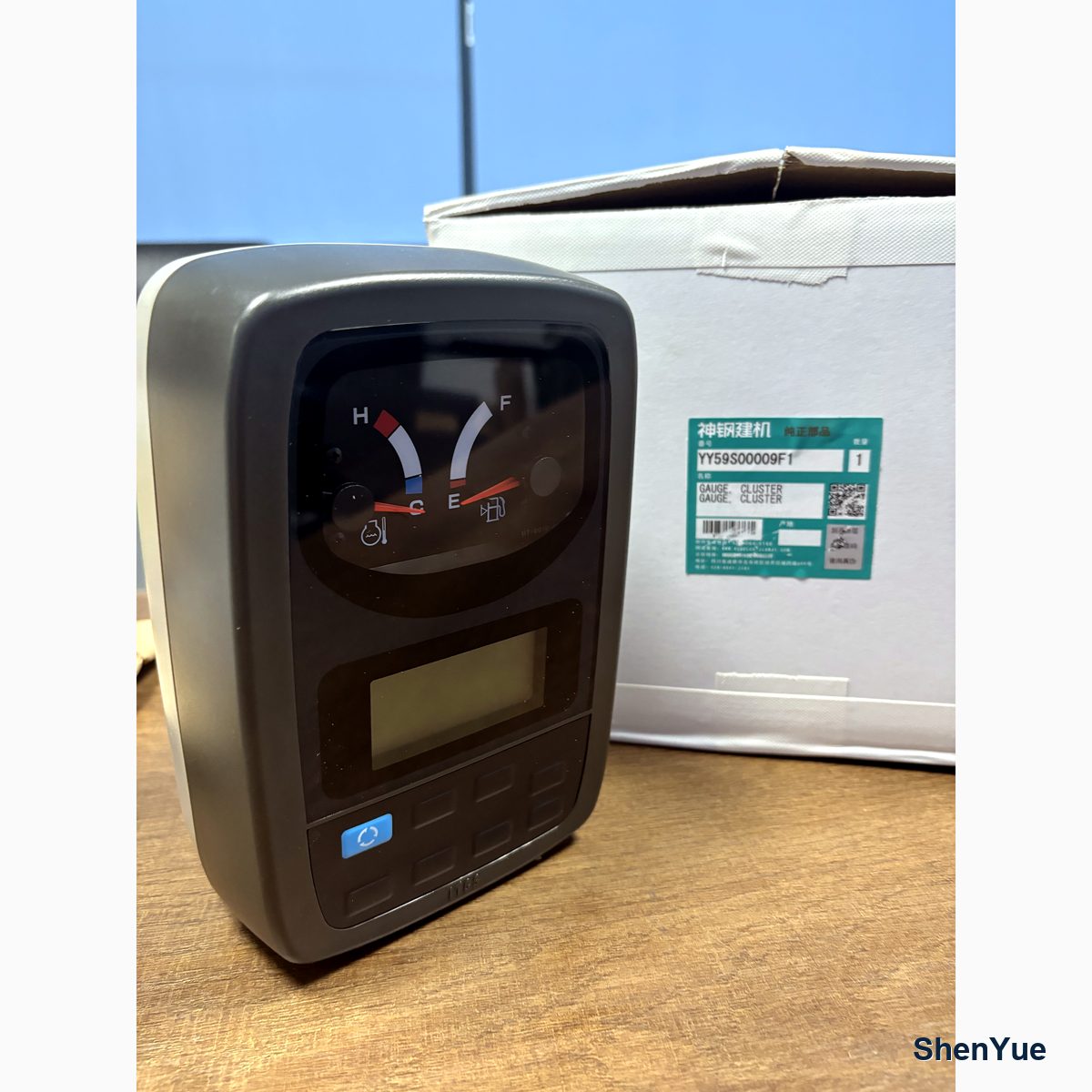
The monitor is the one part every operator touches, so a dead screen stops a machine faster than most mechanical faults. The expensive mistake is ordering a new monitor gauge before proving the power path, because on the machines we see, the majority of "no display" cases are wiring, fuse or ground faults rather than failed screens. Guangzhou Shenyue Machinery Technology Co., Ltd. supplies monitor assemblies and the electrical parts around them, and this is the diagnosis order we walk workshops through.
Read the symptom before touching anything
Three presentations tell three different stories. Completely dark at key-on points to a supply problem. A screen that lights briefly then dies suggests the display starts and something pulls its supply down — often a weakening battery or a failing relay contact. Backlight on with no information points to the signal side rather than power. Note which one you have, and whether the machine still cranks and works: a monitor that dies while the machine runs fine is nearly always a display-side supply fault, not an engine problem.
Step one: fuses, at the right box
Start at the fuse box that feeds the monitor circuit. Check the monitor fuse visually and with a meter — a fuse can look intact and still be open at the end caps. Our records quote the fuse box and relay assembly under YN24S00012P2 for machines in this family, and the relay families behind it are mapped in our relay guide. Fuse ratings matter: a fuse replaced with a higher rating hides the fault that blew the first one. If the fuse is blown, find what blew it before fitting a new one; a chafed harness behind the monitor pedestal is a classic repeat offender.
Step two: supply and ground under load
Measure the monitor supply at the connector with the key on, and measure again while a helper operates the key or a load — voltage that reads fine on an open circuit and collapses under load indicates a bad contact or a tired battery, not a good circuit. Then test the ground leg the same way, because a corroded ground passes a multimeter check and still fails with the display's current through it. Most intermittent "screen comes and goes" complaints end at a ground stud or a connector pin, not at the display.
Step three: only then the monitor itself
With supply and ground proven, a dark screen means the assembly is the suspect. Monitor assemblies are matched to machine family and generation, and the numbers matter: our records include monitor gauge assemblies under YN10M00001S013, YN59S00021F3, YN59E00017F1 and YN14E01102P4, plus a monitor unit recorded under YY59S00009F1. Confirm the number from the old unit's label or the nameplate rather than from a photo of a similar-looking screen — housings look alike across generations while the internals differ.
What replacement actually involves
Swapping the assembly is straightforward; matching it is not. Later monitors may need configuration on first power-up, and hours stored in the old unit raise questions that our hour meter article discusses in detail. Pack the old and new units with real padding — a monitor is one of the few parts that can be broken by shipping, a point our monitor buying guide covers from the warehouse side. Test with the machine running, then check alarms and gauges read sanely before closing the job. Kobelco machine documentation at kobelco.co.jp describes indicator meanings worth reviewing while you are in the menu.
Prevention worth doing at the same time
While the pedestal is open, re-tension the connectors, protect the harness where it flexes, and clean the ground stud. Machines that get this thirty-minute service rarely return with a second dead screen. Every fix that ends at the fuse box or the ground stud should also end with the harness inspected along its flex points, because the same vibration that opened one connector is working on the next. Guangzhou Shenyue Machinery Technology Co., Ltd. keeps monitor assemblies and the fuses, relays and connectors around them within more than 3,000 part types on the shelf, with over 100,000 part numbers available to order, every item graded genuine, OEM or aftermarket before it ships.
Frequently Asked Questions
My Kobelco monitor is completely dark. Is the screen dead?
Not necessarily. Prove the fuse, supply voltage under load and the ground leg first — most no-display cases are power faults. Guangzhou Shenyue Machinery Technology Co., Ltd. recommends this order before any monitor is ordered.
Which monitor gauge fits my Kobelco?
Match by machine family and the label on the old unit. Our records include monitor assemblies under YN10M00001S013, YN59S00021F3, YN59E00017F1, YN14E01102P4 and YY59S00009F1, and the label photo is the fastest way to confirm the match.
Do replacement monitors need programming?
Some later monitor assemblies require configuration on first power-up, and stored hours raise verification questions. Plan for a setup step after fitting, and keep the old unit until the new one is proven in operation.
Why does the screen flicker or come and go?
Voltage that collapses under load — a tired battery, a corroded ground or a bad connector pin. Guangzhou Shenyue Machinery Technology Co., Ltd. sees this pattern more often than failed displays, so test supply and ground with the circuit loaded before replacing the monitor.